PSA E-Certificate (2026): Online Application, Fees, Verification & Download Guide
Request your PSA E-Certificate online and receive a secure digital PDF of your civil registry document. Learn about eligibility, fees, identity verification, delivery, and how to verify your e-Certificate with this complete 2026 guide.
Access a secure, digitally issued PSA E-Certificate online. Learn how to apply, complete identity verification, receive your document, and verify its authenticity using the official verification system.
How to Order Your PSA E-Certificate
Getting your PSA E-Certificate online is quick and secure. Simply follow these four easy steps to complete your request and receive your digitally signed certificate.
📝 Complete Your Application
Choose the type of PSA certificate you need and enter the required personal information accurately. Double-check your details before moving to the next step.
💳 Pay Securely Online
Complete your payment using one of the available online payment methods. Your order will proceed after the payment has been successfully confirmed.
🪪 Verify Your Identity
Upload a clear photo of your valid government-issued ID and complete the identity verification process, including the required selfie verification, to protect your personal information.
📥 Download Your PSA E-Certificate
Once your identity has been verified, you’ll receive a secure email with a link to access and download your digitally signed PSA E-Certificate in PDF format.
Ready to Get Your PSA E-Certificate?
Start your online application today and receive your secure digital certificate through the official PSA E-Certificate service.
PSA E-Certificate Fees (2026)
The cost of a PSA E-Certificate depends on the type of civil registry document you request.
| Certificate Type | Fee |
|---|---|
| 👶 Birth Certificate | ₱290.00 |
| 💍 Marriage Certificate | ₱290.00 |
| ⚰️ Death Certificate | ₱290.00 |
| 👤 Certificate of No Marriage Record (CENOMAR) | ₱345.00 |
| 🕊️ Certificate of No Death (CENODEATH) | ₱345.00 |
| 📑 Advisory on Marriages | ₱345.00 |
| 📑 Advisory on Deaths | ₱345.00 |
Note: Fees are based on the latest published PSA E-Certificate information and may change over time. Always check the official portal for the most up-to-date pricing.
PSA E-Certificate Application Process
Follow these simple steps to complete your online request from start to finish.
🌐Visit the Official Website
Open the official PSA E-Certificate portal and click Order E-Cert to begin your application.
📄 Select Your Certificate
Choose the type of certificate you want to request, such as Birth, Marriage, Death, CENOMAR, or another available document.
✍️ Enter Your Information
Provide the required personal details exactly as they appear on the civil registry record. Review all information before continuing.
💳 Pay the Required Fee
Complete your payment using one of the available payment options provided during checkout.
🪪 Verify Your Identity
Upload your valid government-issued ID and complete the identity verification process, including the required selfie verification.
📧 Receive Your Download Link
After successful verification, you’ll receive a secure email containing a link to access your PSA E-Certificate.
📥 Download and Verify Your E-Certificate
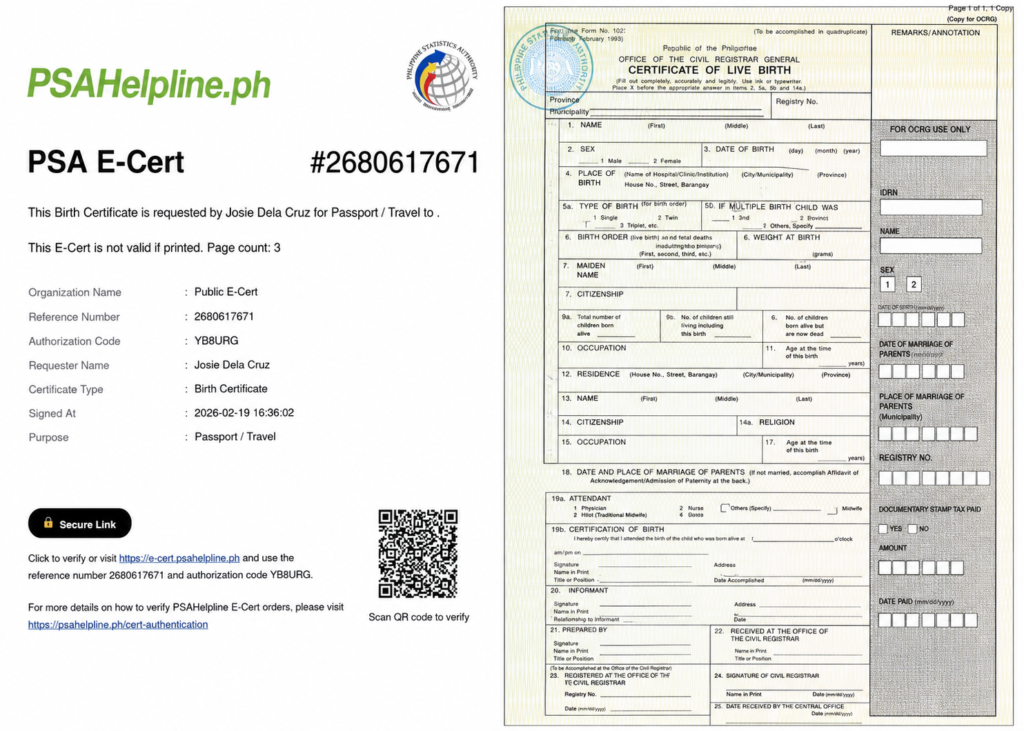
Open the secure link to download your digitally signed PDF. You can verify its authenticity using the QR code or the official PSA E-Certificate verification portal.
Verify Your PSA E-Certificate Using the Official Portal
You can quickly confirm the authenticity of your PSA E-Certificate through the official verification portal. Simply enter the required details shown on your e-Certificate and the system will display the official digital record for verification.
Visit the Verification Portal
Open the official PSA E-Certificate Verification Portal in your web browser.
Enter Your Reference Number
Type the Reference Number exactly as it appears on the cover page of your PSA E-Certificate.
Enter the Authorization Code
Enter the Authorization Code printed on your e-Certificate. Make sure there are no typing mistakes.
Click “Verify”
Select the Verify button to submit your information and begin the authentication process.
View the Official Certificate
If the details are correct, the system will display the official PSA-issued digital certificate. Compare it with your downloaded copy to confirm its authenticity.
💡 Tip: You can also verify your PSA E-Certificate by scanning the QR code printed on its cover page.
Benefits of a PSA E-Certificate
⚡ Instant Digital Access
Receive your certificate online and download it as soon as your application and identity verification are completed.
🏢 Accepted by Many Institutions
The PSA E-Certificate is designed to be verifiable through the official verification system, making it easier for organizations to confirm its authenticity.
🔒 Secure and Protected
Every e-Certificate includes advanced security features, such as digital signing and verification tools, to help protect the integrity of the document.
📤 Easy to Share
You can securely share your digital certificate with schools, employers, government agencies, or other organizations whenever needed.
🚫 No Physical Pickup Required
Complete the entire process online—from application and payment to identity verification and document delivery—without visiting a PSA office.
🌱 Eco-Friendly and Paperless
Using a digital certificate helps reduce paper usage while providing a faster and more convenient document experience.
Identity Verification
Why Is Identity Verification Required?
Identity verification helps protect your personal information and ensures that PSA E-Certificates are released only to the correct applicant. This security step reduces the risk of unauthorized access and identity fraud.
When Does Verification Happen?
The identity verification process takes place after you submit your application and complete your payment. You’ll be asked to upload a valid government-issued ID and complete the required verification before your certificate is released.
How Long Does It Take?
Verification time may vary depending on the accuracy of your submitted information and the quality of your uploaded documents. Make sure all details are correct to help avoid unnecessary delays.
Tips for Successful Verification
- Upload a clear photo of your valid government-issued ID.
- Ensure your personal information matches your ID exactly.
- Use a stable internet connection during verification.
- Follow the on-screen instructions carefully.
Verification Methods
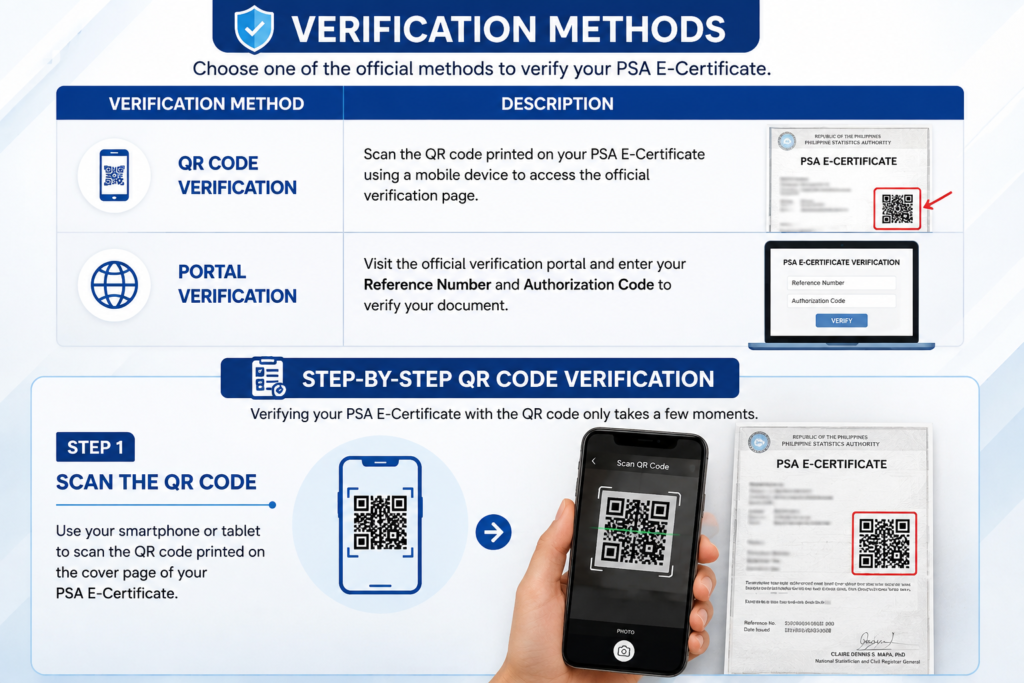
Choose one of the official methods to verify your PSA E-Certificate.
| Verification Method | Description |
|---|---|
| 📱 QR Code Verification | Scan the QR code printed on your PSA E-Certificate using a mobile device to access the official verification page. |
| 🌐 Portal Verification | Visit the official verification portal and enter your Reference Number and Authorization Code to verify your document. |
Benefits of Using a PSA E-Certificate
A PSA E-Certificate offers a fast, secure, and convenient way to access official civil registry documents online.
| Benefit | Description |
|---|---|
| ⚡ Instant Digital Access | Receive your certificate online after your application, payment, and identity verification are completed. |
| 🏛️ Accepted by Many Institutions | The e-Certificate includes official verification features that help organizations confirm its authenticity. |
| 🔒 Secure & Digitally Protected | Protected with digital security features to help maintain document integrity and authenticity. |
| 📤 Easy to Share | Share your digital certificate securely with employers, schools, government agencies, or other organizations. |
| 🚚 No Physical Pickup Required | Complete the entire process online without visiting a PSA office to collect your document. |
| 🌱 Environment Friendly | A paperless solution that reduces printing and supports a more sustainable process. |
Quick Tip
Always download your PSA E-Certificate using the secure link sent to your registered email address, and verify its authenticity through the official PSA E-Certificate verification system whenever required.
Example Scenario: Applying for a PSA E-Certificate
Situation
John works in Manila and needs a copy of his PSA Birth Certificate for a new job application. Because he has a busy schedule, he chooses the PSA E-Certificate service instead of visiting an office.
Submit an Online Request
John visits the official PSA E-Certificate portal, selects Birth Certificate, and completes the online application form with his correct personal information.
Complete Payment
He pays the required fee using an available online payment method and receives confirmation that his payment has been processed.
Verify His Identity
John uploads a valid government-issued ID and completes the required identity verification process, including the selfie verification.
Receive the Download Link
After successful verification, John receives a secure email containing a download link for his PSA E-Certificate.
📥 Download and Verify
He downloads the digitally signed PDF and scans the QR code to verify that the certificate is authentic.
Note: This is a sample scenario created to explain the process. Your experience may vary depending on your application details and verification results.
⚠️ Common Mistakes to Avoid
Avoid these common mistakes to help prevent delays or issues with your PSA E-Certificate request.
| Common Mistake | How to Avoid It |
|---|---|
| 📧 Wrong Email Address | Use an active email address and check it carefully before submitting your application. |
| 💳 Payment Failure | Ensure your payment is completed successfully and keep your payment confirmation. |
| ✍️ Incorrect Personal Information | Double-check your name, birth details, and other information before submitting the form. |
| 🪪 Identity Verification Failed | Upload a clear photo of your valid ID and follow the verification instructions carefully. |
| 🔢 Incorrect Reference Number | Enter the Reference Number and Authorization Code exactly as shown when verifying your certificate. |
💡 Tip: Reviewing your information before submitting your request can help you avoid unnecessary delays.
Frequently Asked Questions (FAQs)
What is a PSA E-Certificate?
A PSA E-Certificate is a digitally issued PDF version of a PSA civil registry document that can be requested online and verified through the official verification system.
Is a PSA E-Certificate legally valid?
Yes. According to the Philippine Statistics Authority, a PSA E-Certificate has the same legal validity as the corresponding physical PSA-issued document when obtained through the official service.
Which certificates are available as E-Certificates?
Available documents include Birth Certificates, Marriage Certificates, Death Certificates, CENOMAR, CENODEATH, and Advisories where offered by the service.
How do I order a PSA E-Certificate?
Complete the online application, make the required payment, verify your identity, and download your certificate using the secure link sent to your email.
How will I receive my PSA E-Certificate?
After successful identity verification, you’ll receive a secure email containing a download link for your digitally signed PDF certificate.
Where can I verify the authenticity of my E-Certificate?
Use the official PSA E-Certificate verification portal or scan the QR code printed on the cover page of your certificate to verify its authenticity.
Ready to Request Your PSA E-Certificate?
You now have everything you need to request, verify, and download your PSA E-Certificate. Follow the official process, prepare your information carefully, and complete your application with confidence.